Free AI Background Remover — Remove Any Background in Seconds
Upload any photo and this online AI Background Remover cuts out your subject with crisp, hair-level edges — no manual masking, no Photoshop, just one click.


Background Removal That Keeps Every Edge
A cutout only looks real when strands of hair, soft fur, and fine product edges survive the cut. Our background remover is tuned for exactly those details, so your subject lifts cleanly onto transparency — no hard, pasted-on outline.
One-Click Background Removal
Upload a photo and AI Background Remover lifts your subject off its background in seconds — crisp edges, watermark-free, ready to download in your browser.


Hair-Level Edge Precision
AI Background Remover traces fine strands of hair, soft fur, and intricate outlines, so the cutout reads like a real isolated subject — not a rough lasso selection — on any background.


Remove Product Backgrounds for Ads & Catalogs
Use AI Background Remover to strip the background from any product shot and reuse it across ads, catalogs, landing pages, and social posts — keep it transparent, or switch to clean white for storefront-ready imagery.


Drop Your Subject Onto a New Background
Remove the original background, then place your cutout on a fresh one — a brand color, a gradient, or a whole new scene. It is ideal for product shots, profile pictures, and ads.
 Original
 Transparent background
 New background
What Makes AI Background Remover Stand Out?
The best AI Background Remover for everyday production: one-click isolation, true alpha transparency ready to composite, and watermark-free downloads for free users with higher limits for paid users. Every job shows its credit cost before you generate.
One-Click, No Manual Masking
Skip the pen tool and tedious selections. Upload an image and AI Background Remover detects the subject and clears the background on its own in a single pass.
Transparent Background, Ready to Composite
AI Background Remover returns true alpha-channel transparency, so you can drop your subject straight onto any color, gradient, or photo background in your editor of choice.
Watermark-Free Downloads
Free accounts include free credits, so you can run AI Background Remover and download cutouts without a watermark. Paid users get higher usage limits and higher priority.
One Wallet Across Every Tool
AI Background Remover draws from the same pay-as-you-go credit wallet you use across all AIGenTools — top up once and spend it wherever you need, no separate plan per tool.
Browser-Based, Nothing to Install
Run AI Background Remover online from any modern browser — no download, no plugin, no Photoshop. Upload, remove a background, and grab your cutout in the same window.
Private by Default
AIGenTools does not train its own models on your uploads or outputs. AI Background Remover processes images only to produce your result, and deleting an image removes the upload plus results, no backup copy.
How to Use AI Background Remover
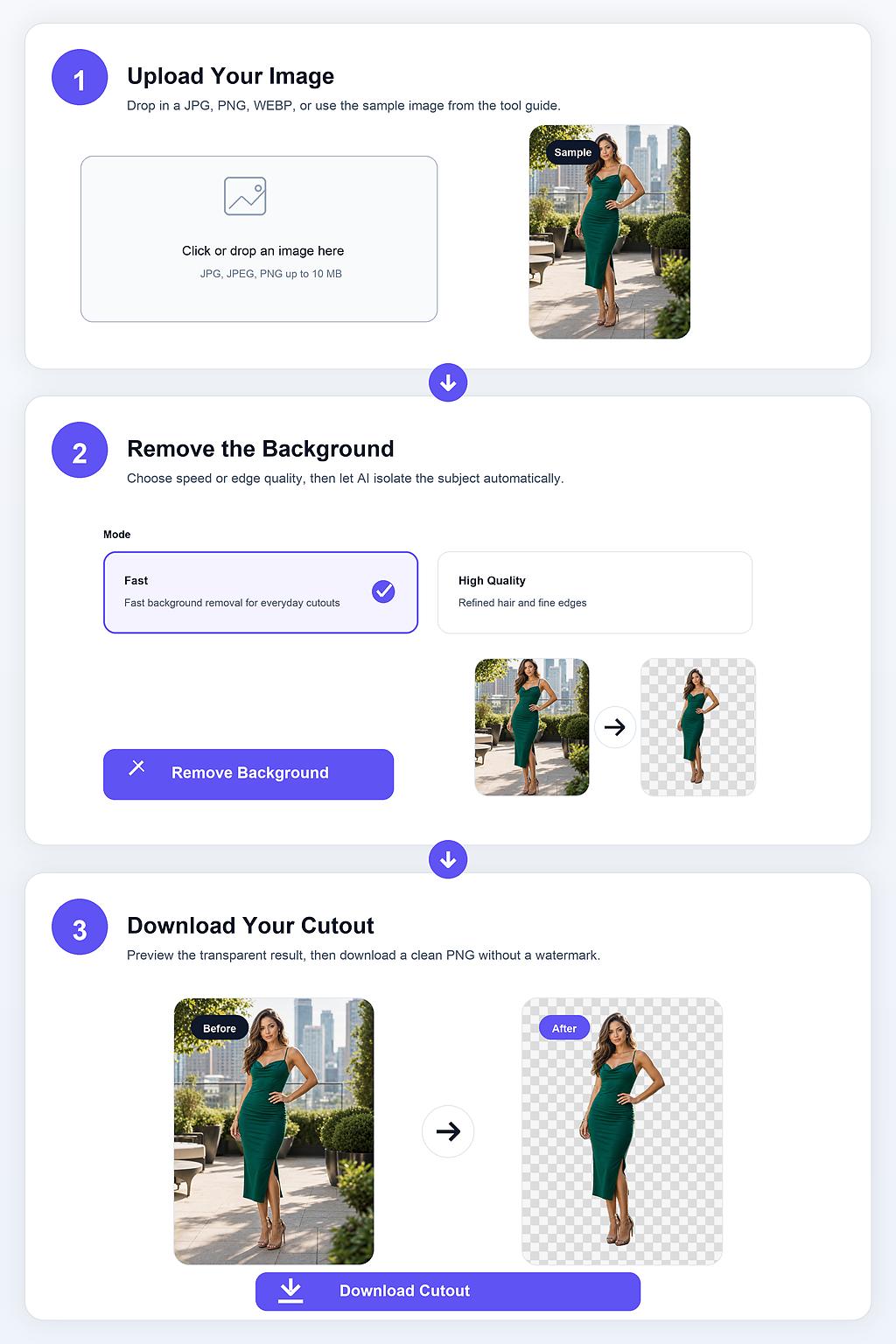
Step 1 Upload Your Image
Drop any common image into AI Background Remover — JPG, WEBP, and more. A clear subject against a reasonably distinct background gives the cleanest cut, but it handles busy scenes too — no cropping or manual masking needed.
Step 2 Remove the Background
Click Remove Background and AI Background Remover isolates the subject, tracing fine edges automatically. The credit cost is shown first, and most images finish in a few seconds.
Step 3 Download Your Cutout
Preview the cutout, then download it watermark-free. Composite it onto a new background, or use it as-is for a profile picture, product listing, or sticker.